Chasing rent
Tenants pay in the app. You see who paid and who has not without sending a single reminder yourself.
Rent collection, maintenance, inspections, screening and documents. For managers, tenants and agents, in English and French.
Most software gives the manager a dashboard and everyone else an email. Here the tenant, the agent and the contractor work inside the same record, so nothing has to be forwarded to anyone.
Rent status, open requests and inspection history for every unit, without having to ask anyone for an update.
Pays rent, reports a problem with photos attached, and reads their own lease without emailing for a copy.
Schedules visits, runs screening on an applicant, and drops the signed lease straight into the unit's file.
Opens the request, sees the photos, answers in the same thread, and closes it out when the work is done.
This is the screen a tenant sees when something breaks, which is where most of a managed building's day actually starts.
The unit is already known. Nobody files a request against the wrong apartment, so nobody has to work out which one they meant.
Photos and video attach to the report. The contractor arrives knowing what they are fixing instead of booking a second visit for parts.
Entry permission is captured up front. That one question is usually two phone calls and a missed afternoon.
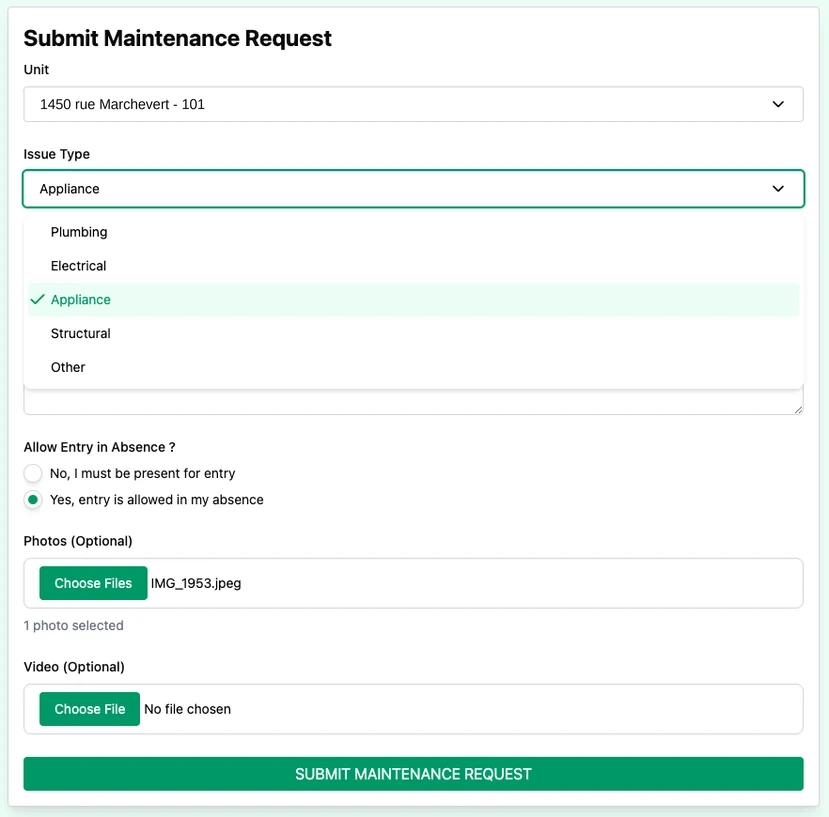
That single submit is the whole trigger. Here is the same request from the other three seats in the building.
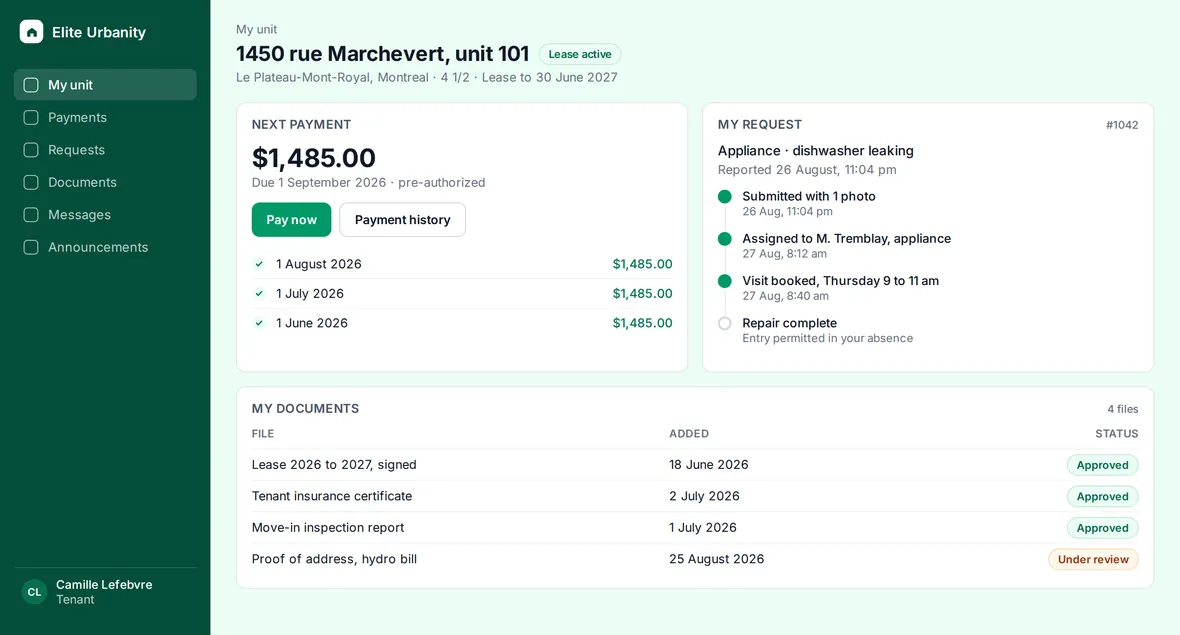
Picks the unit that is already theirs, chooses the issue type, attaches the photo and answers the entry question. Forty seconds, at eleven at night, with nobody to call.
They get a status they can check instead of phoning to ask.
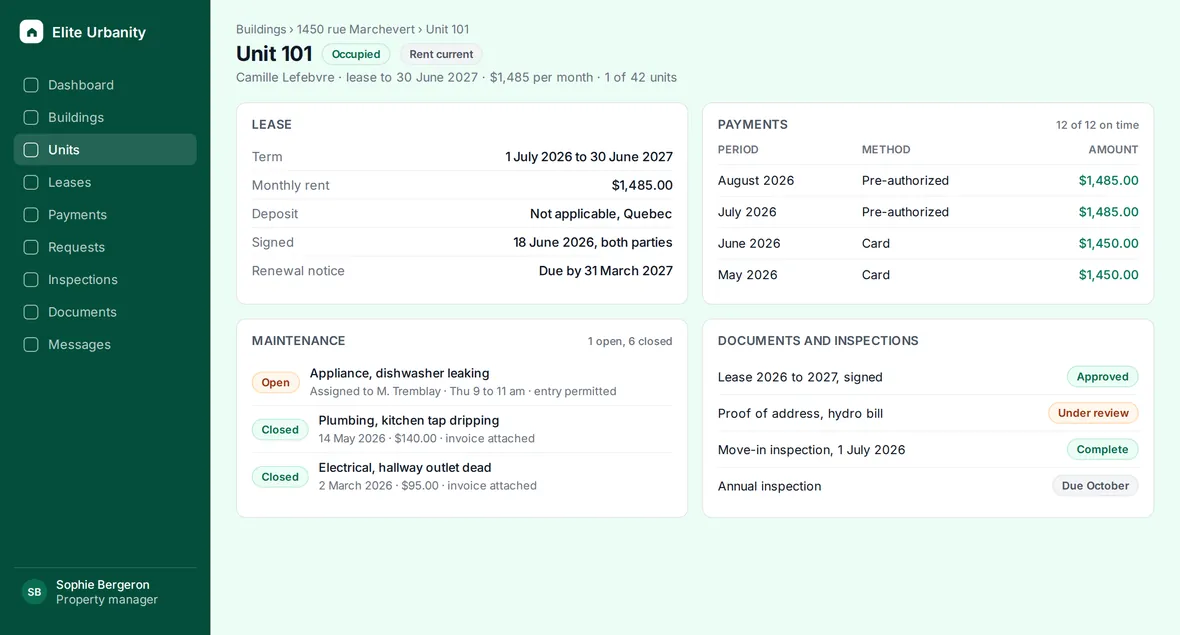
The request lands on that apartment's own record, beside its lease, its payment history and its last three repairs. Dispatching it is one action, not a thread.
No inbox to triage, no working out which building it was.
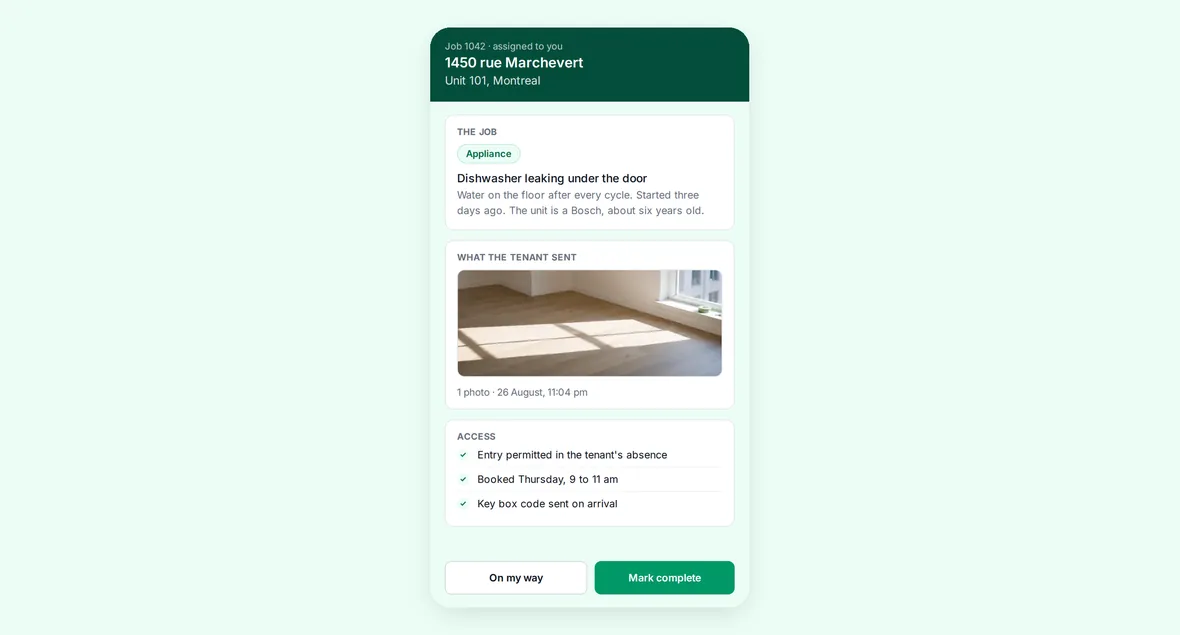
The plumber, the electrician or the appliance tech opens the request with the address, the photos and the entry permission already in it. Nothing to create, nothing to remember.
One visit instead of a look, a parts run and a second visit.
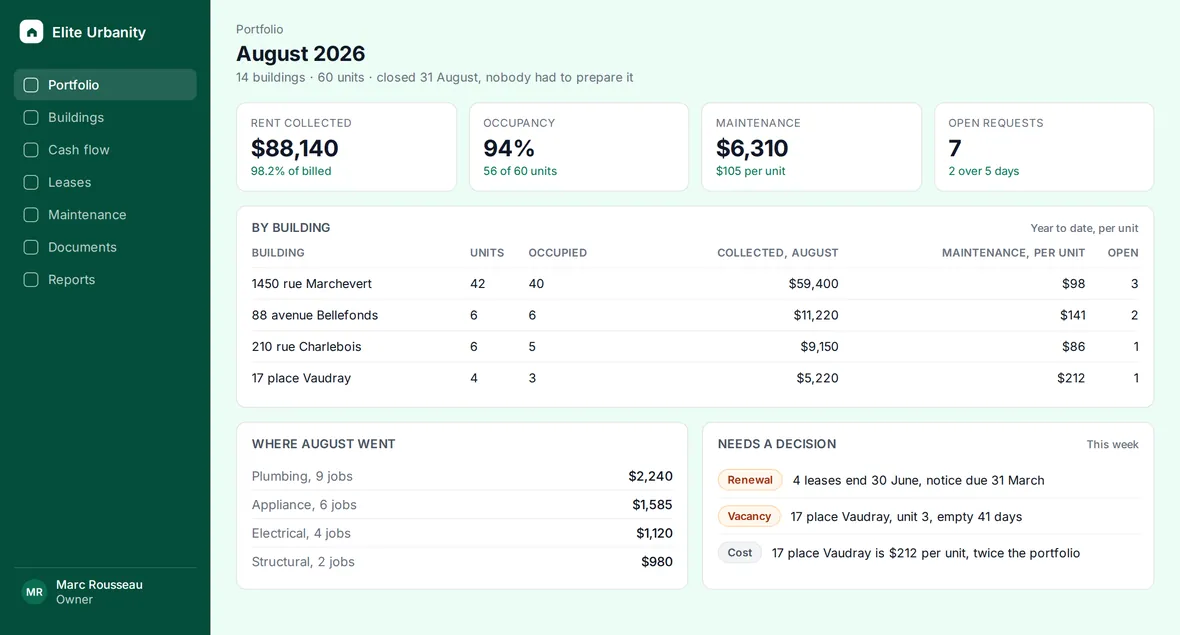
The invoice closes against the same unit, so what a given apartment costs to keep is a fact on the page rather than a spreadsheet somebody has to build in January.
Sees the building without asking anyone to prepare a report.
The tenant request above is a screen capture. The four role screens are drawn from the same data model, on a sample building, so no real tenant, lease or invoice appears on this page.
Tenants pay in the app. You see who paid and who has not without sending a single reminder yourself.
Leases, notices, rules and certificates stored against the unit they belong to.
Requests arrive with photos and a chat thread attached. Contractors join free.
Visits, inspections and renewals on one calendar, with reminders that go out on their own.
Pre-lease and post-lease inspections sit side by side, with photos and timestamps. When a deposit is disputed you have the record instead of a memory.
English and French in the same app, chosen per person. A bilingual building does not need two sets of notices, two templates, or somebody translating a repair request at nine at night.
The tenant picks their language. So does the owner. Neither choice is your problem.
Not in a folder named after it, not in an inbox, not in somebody's head. The lease, the payments, the repairs, the inspections and the photos all hang off the same record, so the building answers the question instead of you.
1450 rue Marchevert, unit 101
That is the whole product. Everything else on this page is a consequence of it.
One to twenty units, no office, no staff. The work happens between other work, on a phone.
Rent arrives in the app, not by e-transfer you have to reconcile by hand.
One calendar for visits, repairs and inspections, with reminders you did not have to set.
Everything on a phone, because the work happens in the ten minutes between other things.
Several buildings, a small team, and owners who ask questions you need an answer ready for.
Portfolio analytics across every building, plus per-building reporting an owner can actually read.
Unlimited admin users on Business and up, so your team is not a line item.
Per-building billing that maps to how you charge owners, instead of one blended invoice you have to split.
A board that changes every year, and records that have to outlast whoever is holding the binder.
Fee collection with a paper trail, so who paid what and when is a record rather than a recollection.
Documents stored per unit, including rules, certificates and notices, available to the next board.
Notices sent and logged in one place, so a delivery date is never something you have to argue about.
Showings, screening and signatures, compressed into as few days as possible.
Screening before signing, so a background check is not the thing holding up the lease.
A visit calendar prospects book themselves, instead of eleven messages to find a Tuesday.
Unlimited agents at no extra cost, so adding a colleague to a listing costs nothing.
Plumbing, electrical, HVAC, cleaning, snow. You work for several buildings and not one of them tells you the same way.
The request arrives complete, with the unit, the photos and whether you can enter when nobody is home. You quote once instead of driving out to look.
You answer in the same thread, so the manager, the tenant and you are reading one conversation rather than three.
It costs you nothing. The building pays for the software. You are added as a contact and keep working the way you already do.
A short demo against your own portfolio, so you can see whether this fits before anyone talks about a contract.
We come prepared. Tell us the shape of the portfolio and the demo starts from your situation instead of a generic tour.
Transparent plans. Owner plans are listed below. For 50+ doors, we prepare a quote tailored to your organization.
English or French. Whichever you and your tenants prefer.
One calendar month plus one week free. Card collected by Stripe; no charge during the trial.
The same complete toolkit for every owner. Pricing scales with your portfolio size, not with features you need to unlock.
1–10 doors
49 $ CA / month
For your first rental units: keep rents, documents and maintenance together.
CAD $4.90 per door/month at full capacity
11–24 doors
89 $ CA / month
For a growing portfolio: follow your buildings and coordinate your team in one workspace.
CAD $3.71 per door/month at full capacity
25–49 doors
149 $ CA / month
For a larger portfolio: keep financial and operational activity visible across your buildings.
CAD $3.04 per door/month at full capacity
50+ doors
Custom quote
For organizations managing 50 or more rental units.
Tell us your unit count and organization’s needs. We’ll confirm the scope and price with you.
Contact usNew owners: complete Stripe Checkout below to receive your personal code by email. Your card is collected now; charges begin only after the trial. Existing owners can subscribe from their account without losing the remaining trial.
One door means one rental unit. Your plan covers the total across your buildings.
One calendar month plus one week free, starting when your checkout is created. Stripe shows the first billing date. Monthly charges start automatically after the trial unless you cancel beforehand. Applicable taxes are added. Mobile access is included.
Tenants, managers, agents and vendors: free access.
Bring one building to the demo. If it does not obviously save you time, you have lost half an hour.
Automated. For anything it misses, book a demo and a person answers.
Choose your plan and continue to secure Stripe Checkout. Enter your card now; nothing is charged during your free trial. We email your personal owner code after Stripe confirms the subscription.